
Pocket Export Broken? Save Your Tags Before Shutdown

 Pedro Martins
On this page
If you are reading this, you probably received the email from Mozilla, or you've seen the headlines on TechCrunch.
Pocket is officially shutting down on July 8, 2025. ⚠️
For those searching for a Pocket alternative in 2026, this guide covers everything you need to know about migrating your data safely.
For millions of users, this isn't just an inconvenience; it’s a digital crisis. You have likely spent the last decade saving articles, recipes, tutorials, and research papers. That "Read Later" list isn't just a list—it's your external brain. It’s the history of what you’ve learned for the past 10 years.
But there is a bigger problem than the shutdown itself. Users on Reddit and Hacker News are reporting that Pocket's official export tool is technically flawed.
If you use the standard "Export to HTML" feature, you might get your list of links, but you risk losing the context: your custom tags, your "Archived" vs. "Favorites" status, and your highlighted passages.
In this comprehensive guide, we will explain exactly why the export is failing for so many users and provide a fail-safe method to migrate your entire library to Bookmarkjar ®—the bookmark manager built for 2026 and beyond.
1. The "Pocket Apocalypse" Timeline
Before we dive into the technical fix, it is crucial to understand the urgency. Mozilla has set a strict, non-negotiable timeline for the sunset of the Pocket service.
Crucial Deadlines for Your Data:
- July 8, 2025: The app goes "Read Only." You can no longer save new links via extensions or the app.
- September 1, 2025: The API shuts down. Third-party integrations (like IFTTT or Zapier) will break.
- October 8, 2025: Total Data Deletion. All user data is wiped from Mozilla's servers.
If you do not perform a complete export before October 8th, your data is gone forever. There is no grace period. ⏳
2. The Technical Problem: Why Standard Exports Fail
Why are so many users complaining about "broken exports"? The issue lies in the data format Pocket uses for its standard export tool.
The HTML "Flattening" Issue
When you go to Options > Export in Pocket, it generates a generic HTML file. This format was the standard in 2015, but it is woefully inadequate for modern knowledge management.
The HTML file is essentially a long list of <a href="..."> links. It often strips away the rich metadata you've added over the years.
- Tag Separation: Pocket stores tags in a separate database layer. The HTML export often dumps these tags as a simple text string or, in some cases reported by users, omits them entirely for archived items.
- Date Loss: The "Date Added" timestamp is frequently converted to a generic format or lost. This ruins your ability to sort your library chronologically.
- Status Confusion: Distinctions between "Archive" (read) and "My List" (unread) are often merged. When you import this into another tool, you end up with 5,000 "unread" items, cluttering your new workspace instantly.
The "JSON" Trap
Advanced users try to request a JSON export, but Pocket’s GDPR download often provides a ZIP file where the metadata (your tags) is stored in a file called il_meta.json, while the links are in list.csv.
Most bookmark managers (Chrome, Raindrop, Safari) cannot read this split format. They only look at the CSV, meaning they ignore your tags completely.
3. The Solution: A Data-Safe Migration to Bookmarkjar ®
The good news? Even if Pocket's export loses your tags, Bookmarkjar ® can recover them. Our universal HTML importer accepts any standard bookmark export, and our AI-powered organization fills in the gaps automatically.
Here is the step-by-step guide to saving your digital brain.
Step 1: Export from Pocket (HTML is Fine)
Use Pocket's standard export—don't worry if tags are missing. The HTML format works perfectly for the initial import.
- Log in to your Firefox/Pocket account.
- Go to Options > Export.
- Download the HTML file to your computer.
- Optionally, also request the GDPR Full Archive for backup.
Note: The HTML export is instant. The GDPR archive can take up to 2 hours but contains additional metadata.
Step 2: Import to Bookmarkjar ®
Our universal importer handles all standard bookmark formats—HTML, JSON, or CSV. No special "Pocket mode" needed.
- Log in to your Bookmarkjar ® Dashboard.
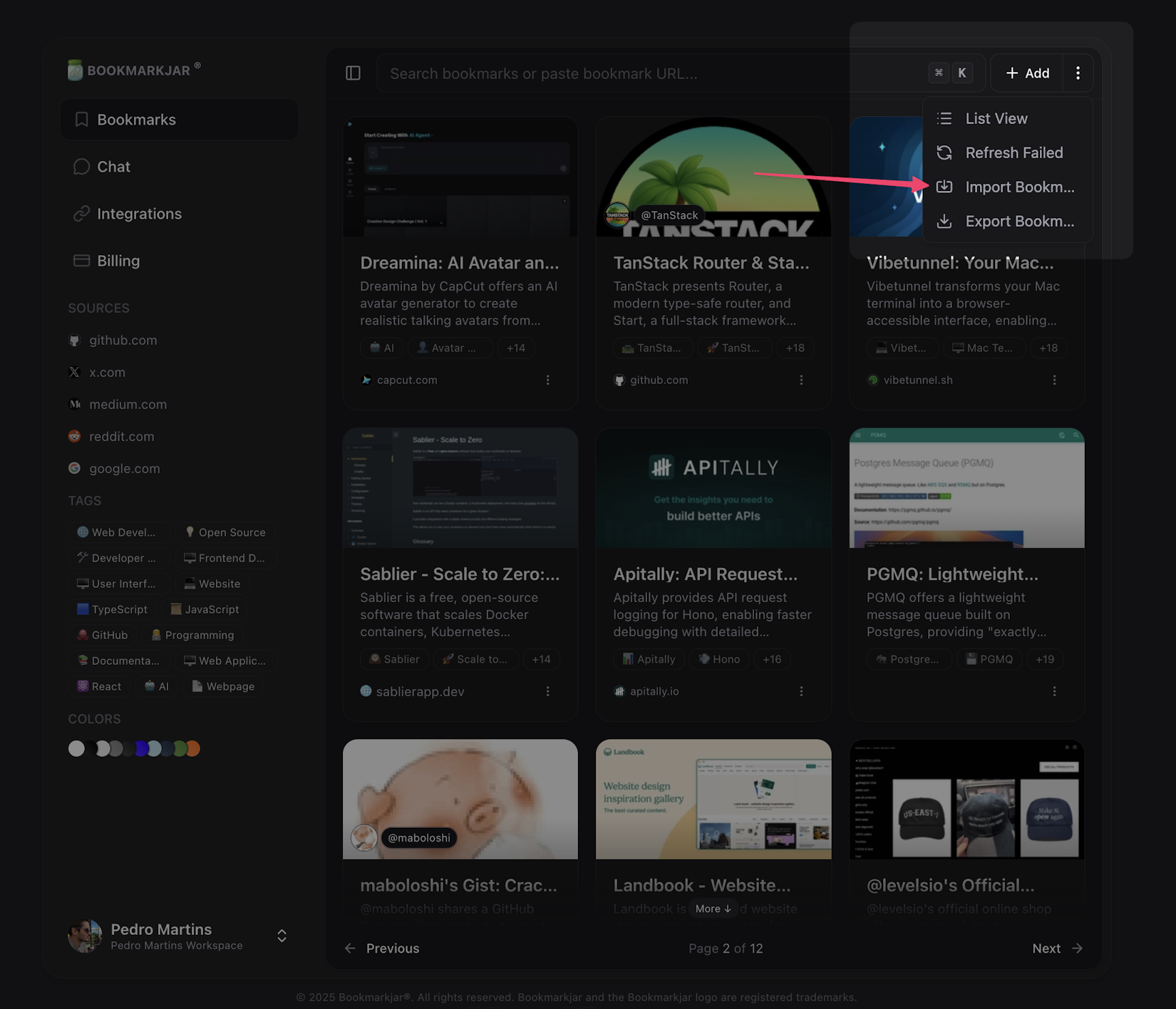
- Go to Bookmarks > Import.
- Select "Import from File" and choose your export.
- Drag and drop your
ril_export.htmlfile into the upload zone.
Step 3: Let AI Rebuild Your Organization
This is where Bookmarkjar ® shines. Even if your export lost tags, our AI reconstructs your organization automatically:
- 🏷️ Smart Auto-Tagging: Our AI reads each bookmark's content and suggests relevant tags. Articles about React get tagged
#react, recipes get#cooking. - 🔗 Dead Link Detection: Our "Link Rot" detector pings every URL. If a page from 2016 is 404 (dead) or private, we flag it with specific tags so you know which bookmarks need attention.
- 🤖 Intelligent Categorization: For the thousands of links you never tagged, our AI analyzes the domain and title to create a proper folder structure.
Migration Success
Once the import completes, your library is live—often better organized than it was in Pocket. You haven't just saved your data; you've upgraded it.
4. Why Not Just Use Raindrop.io?
Many users consider Raindrop.io as the default Pocket replacement. It is a great tool, but for heavy Pocket users, there are specific friction points in 2026. If you're evaluating options, check out our detailed Pocket vs Bookmarkjar comparison.
| Feature | Raindrop.io | Bookmarkjar ® |
|---|---|---|
| Import Speed | Slow for >5k items | Instant (Streaming Import) |
| Search | Full-text is Paid ($$) | Full-text included |
| Missing Tags | Manual re-tagging | AI Auto-Tagging |
| AI Features | Limited | Auto-Tagging & Summarization |
| Visuals | Can lag with large grids | Zero-Lag Rendering |
Raindrop is excellent for casual users, but if you have a massive library (10,000+ items), users have reported significant slowdowns and search timeouts. Read our in-depth Raindrop.io performance analysis for technical details. Bookmarkjar ® was built on a modern infrastructure designed to handle "Developer-grade" libraries without stuttering. As a read-it-later app and bookmark manager, it combines the best of both worlds.
5. How to Verify Your Data Is Safe
After you import, you should verify the integrity of your data. Here is a quick 3-point checklist to run inside Bookmarkjar ®:
- Check the "Oldest" Sort: Sort your library by "Date Added (Oldest)". Do you see your first saved link from 2014? If yes, the timestamp migration worked.
- Test a Specific Tag: Search for a niche tag you used, like
#Trip2018. Ensure all the relevant links are there. - Check "Read" Status: Go to the "Archive" folder in Bookmarkjar ®. It should contain everything you had archived in Pocket.
6. Future-Proofing Your Bookmarks
The shutdown of Pocket teaches us a valuable lesson: Never lock your data into a "Walled Garden."
At Bookmarkjar ®, we believe your data belongs to you. That is why we offer:
- 💾 Daily Backups: We backup your data automatically.
- 📄 Open Formats: Export your Bookmarkjar ® library to CSV, JSON, or standard HTML at any time. Import from CSV, JSON, or HTML too.
- 🔌 API Access: All plans include API access—create an API key and you're ready to integrate with your own tools and workflows.
Frequently Asked Questions
Can I import my highlights?
Yes. If you used Pocket's highlighting feature, we import these as "Notes" attached to the bookmark. They are fully searchable.
What happens to my "Recommended" feed?
Pocket's recommendation algorithm is proprietary and cannot be exported. However, Bookmarkjar ® uses AI to suggest content based on what you actually save, not what advertisers pay to show you.
Is Bookmarkjar ® free?
We offer a generous free tier that supports importing unlimited bookmarks. Advanced AI features like auto-tagging and summarization are part of our Pro plan.
Conclusion: Don't Wait Until October
The servers at Mozilla are already struggling under the load of export requests. The closer we get to the July and October deadlines, the slower the process will become.
Whether you call it a Pocket alternative, a save for later app, or simply your new bookmark organizer—Bookmarkjar ® is built to be the home for your digital library in 2026 and beyond.
Don't gamble with your digital memory. Start your migration to Bookmarkjar ® today and experience what a modern, fast, and intelligent bookmark manager feels like.
It takes 3 minutes to switch, but it saves 10 years of reading. ✨